Take Control of Your Petty Cash.
Replace WhatsApp approvals, missing receipts and month-end chasing with a simple, controlled petty cash process built into NAVAC BMS.
Nairobi Branch — Balance
KES 18,400.00
Custodian
J. Wambui
PC-0412 · Fuel
Settled — receipt attached
Float Alert
Running low
Your Petty Cash Shouldn't Depend on Memory.
When approvals live in WhatsApp, receipts arrive late and balances are checked manually, small expenses quickly become a big accountability problem.
Approved Over WhatsApp — or Not at All
A petty cash request gets a thumbs-up in a chat thread, or nobody approves it at all. There is no record of who actually authorised the spend, and no way to prove it later.
Receipts That Never Turn Up
Receipts arrive weeks late, if they arrive at all. By the time anyone asks, nobody can say with certainty what a request was actually spent on.
A Float That Runs Dry Without Warning
Nobody notices a float has emptied until someone needs cash for a genuine business expense and finds none left in the box.
Month-End Means Chasing Paper
Reconciling what was actually spent against what is left in the float means rebuilding a trail that should never have gone missing in the first place.
From Request to Reconciliation. Everything Stays on Record.
Requests Go Through Approval
Every petty cash request follows the approval level required for its amount. No one can approve their own request.
Pay the Way Your Business Pays
Disburse approved requests through M-Pesa, bank transfer or cash — and keep the payment record attached to the original request.
Receipts Stay With the Expense
Upload supporting documents against each spend so finance does not have to search through WhatsApp conversations.
Know Before the Float Runs Low
Set a minimum balance for each float and get alerted before the money runs out.
Every Change Leaves a Trail
Once transactions are recorded, the history stays visible. Know what happened, who did it and when.
Reports Are Ready When You Need Them
See spending, requests, disbursements and outstanding items without rebuilding reports in Excel.
Six Steps. One Complete Record.
From the moment someone requests cash to the moment finance reconciles it, every step stays connected.
Stage 01
Request
Staff request the amount they need, why they need it and the relevant category.
Stage 02
Approval
The request automatically goes to the right approval level based on the amount.
Stage 03
Disbursement
Once approved, payment is recorded through M-Pesa, bank transfer or cash.
Stage 04
Settlement
The person who received the money records what was actually spent and attaches the supporting receipt or evidence.
Stage 05
Reconciliation
Finance confirms the amount released against what was spent and settled.
Stage 06
Reporting
Management sees the numbers, history and outstanding items whenever they need them.
Everything You Need to Run Petty Cash Properly
Requests & Approvals
- Controlled request workflow
- Multi-level approvals
- Self-approval blocked
- Automatic approval rules
- Full approval history
Disbursement & Settlement
- M-Pesa, cash or bank transfer
- Track every disbursement
- Receipt upload against each expense
- Full disbursed-to-settled history
- Confirmation before retrying payments
Accounts & Oversight
- Multiple petty cash accounts
- Low-balance alerts
- Reconciliation history
- Searchable transactions
- Live management reports
Everyone Gets the Right Level of Control
Requesters
Staff request the cash they need for genuine business expenses and track the status of their request.
Approvers
Managers and finance teams approve requests at the level assigned to them — never their own requests.
Custodians
The person responsible for a float always knows what has been issued, spent and remaining.
Finance & Owners
Finance and business owners get a clear view of balances, spending, outstanding requests and reconciliation.
Petty Cash Is Already Part of NAVAC BMS
You do not need another system just to control petty cash. NAVAC BMS brings petty cash together with your clients, sales, invoicing, payments, communication, HR, insurance, logistics and more — all under one login.
One system. One team. One source of truth.
All included. Plans differ by team size, not by feature.
Try NAVAC BMS Free for 14 Days. No Card. No Commitment.
Petty Cash is included in NAVAC BMS. You get the full system from day one — your price is based on team size, not on the features you choose.
KES 7,500
5 users included
KES 75,000
Two months free
Everything You Need to Know Before You Start
Does Petty Cash replace our accounting system?
No. NAVAC Petty Cash controls the petty cash process — requests, approvals, payments, settlement and reconciliation. It works alongside your accounting system; it does not replace your accountant or general ledger.
Can we manage more than one petty cash account?
Yes. Create separate accounts for different branches, departments, projects or business units, each with its own custodian, balance and low-balance threshold.
Who can approve a petty cash request?
You decide who can approve each amount level. The system routes requests according to your approval rules, and no one can approve their own request.
What if we pay someone in cash instead of M-Pesa?
No problem. Cash, M-Pesa and bank transfers can all be recorded against the same request so your records stay complete regardless of how the money was paid.
What happens when a receipt is missing?
You can record the available evidence and settle the expense against the disbursement. The system keeps the record instead of leaving the transaction unexplained.
Will my staff need training?
Petty cash requests are designed to be simple enough for everyday staff to use, while approvals, reconciliation and reporting are built for managers and finance teams.
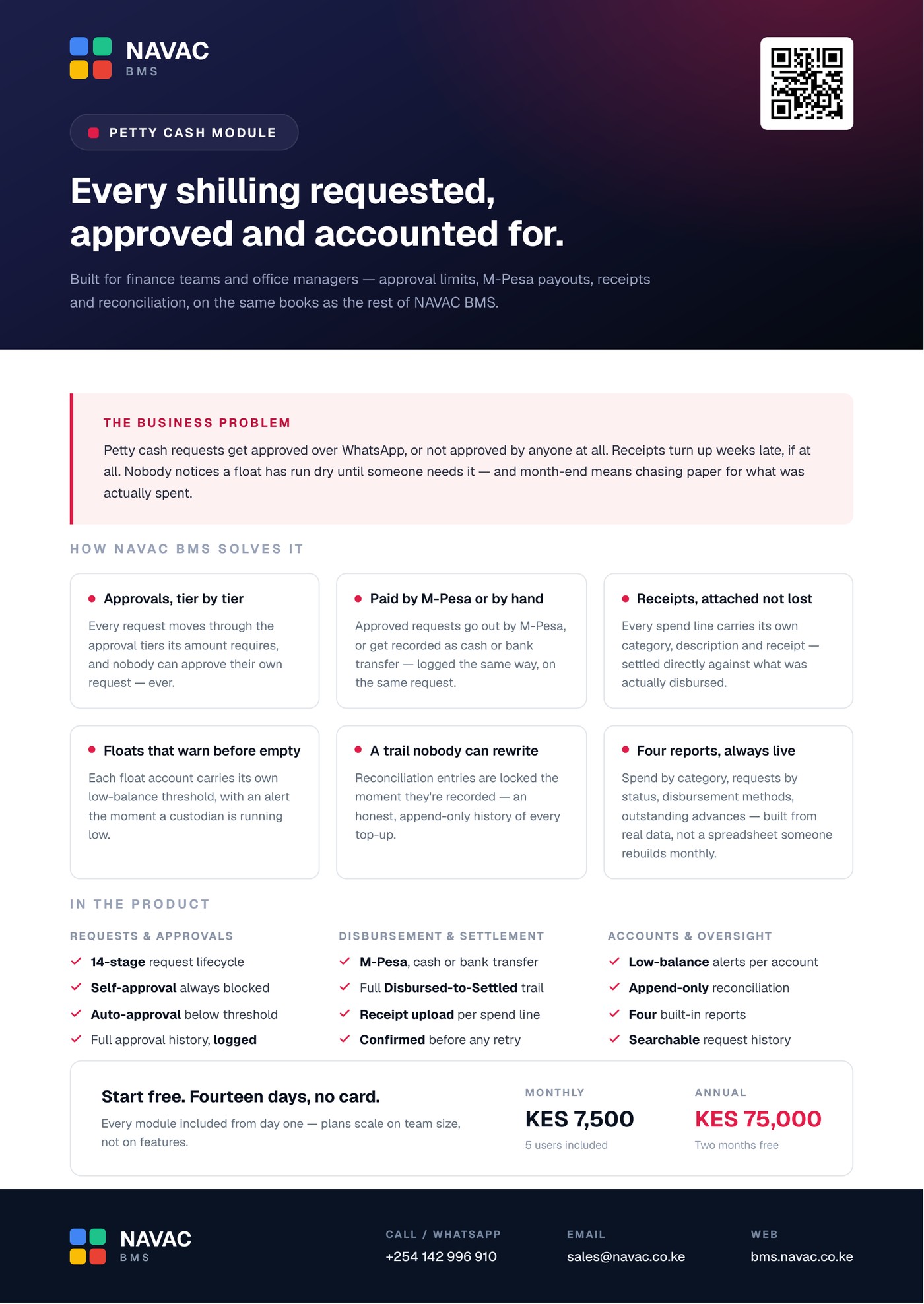
Take Petty Cash to your next meeting.
One page, everything that matters — the problem, how NAVAC BMS solves it, what is in the product, and what it costs. Built for printing and for finance teams.
- The business problem, in one paragraph
- How NAVAC BMS solves it, plainly described
- Approvals, disbursement, settlement and reconciliation
- Pricing, with no asterisks
Follow the step-by-step Petty Cash User Guide
From your first float to reading the reports — no technical background needed.
Lock the Float. Open the Books.
Set up Petty Cash before your next float runs dry unseen. Start with 14 days free, get full access to every module, and receive guided onboarding from our team.